Chatbots. From ELIZA to Alexa, we have come to live in a world where we are no longer conversing with just other people. While these chatbots hold no actual life, certain attributes sometimes make it almost easy to forget that there is no actual person on the other side of these conversations. Why is that?
For this project, I teamed up with two other students, Courtney and Scott, to try to build a chatbot that attempts to serve a function that requires a human connection. Specifically, we built a chatbot that would assist a student looking for job interview practice/advice.
(Here is a link to the GitHub repository for SIA.)

First-Stage Planning.
Before even thinking about the dialogue or the implementation of the chatbot we had to think about what sorts of topics or functions would invoke this sort of human connection we were looking for. We had been given a couple of basic prompts to guide us:
- Teaching someone a specific topic (eg. understanding and applying Bayes rule, understanding and applying Boolean logic, etc.)
- Counseling someone who is struggling emotionally (eg. from a bad breakup, from a loss of a loved one, etc.)
- Debating someone on a contentious topic (eg. abortion rights, gun rights, euthanasia, etc.)
Using these prompts, we began by coming up with a list of possible functions that we might be interested in exploring.
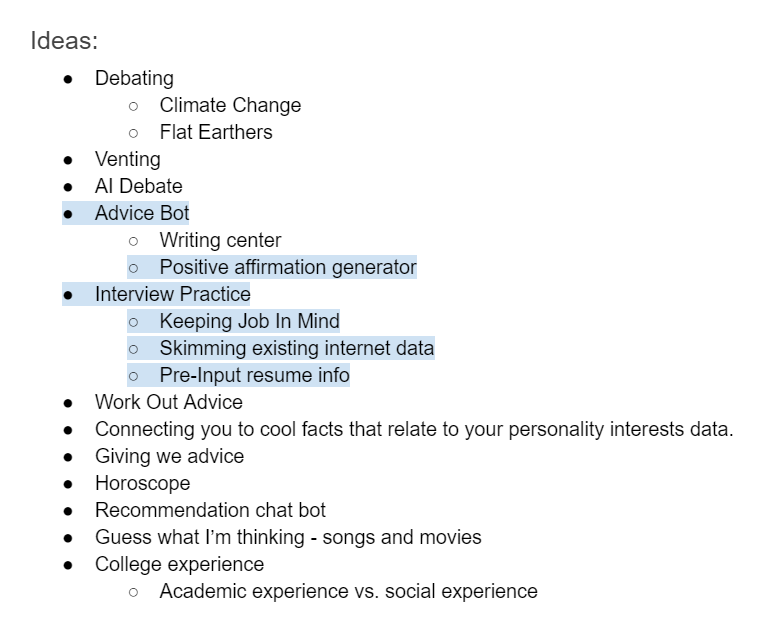
We expected, as we were told, that building a chatbot involving human connection would be difficult to achieve perfectly, perhaps even impossible. A chatbot has conversational constraints that humans would not have, either due to difficulty of implementation or simply just lack of emotional intelligence. With this in mind, there were a couple of considerations we had to make as well as goals to think about while choosing a function that would at least allow the chatbot to attempt a baseline human connection:
- Emotional aspect: Some ideas that we had discussed, although interesting, seemed to lack an emotional aspect, in that most of the responses the chatbot would give would be objective statements such as facts.
- Natural conversation: Sort of tying into the first point, we needed to make sure that our chatbot wouldn’t just be asking multiple-choice type questions or responding only to yes or no questions. We needed to make sure that the function we chose would allow both the chatbot and user to send open-ended, or seemingly open-ended, messages.
- Applicable human experience: Since the chatbot should be serving a function that requires human connection, we figured that it would be much best to choose a concept that we, ourselves, were already somewhat familiar with and had experience with. This would make it a lot easier to create a realistic conversation.
After some thought and discussion of these, we narrowed our choices down to the positive affirmation chatbot and the job interview practice chatbot and eventually chose the latter. From here, there were several questions that we had to ask ourselves regarding the chatbot:
What function would the bot serve specifically?
There were two functions that we had in mind for this chatbot. The first was to have the chatbot give advice, simply having the user send what it was about the interview process they were struggling with and having the bot give direct comments based on keywords in the users message. The second was to have the chatbot hold a mock interview, where the chatbot itself would ask potential interview questions which would prompt the user to send their answers to said questions.
What kind of questions would this bot ask?
In order to have at least somewhat of a smooth flow, we knew that the chatbot would have to appropriately interact with the user after a user sends a message. In our case, we planned to achieve this by having the chatbot itself lead the conversation, asking questions that the user would have to answer. We needed to plan out what kind of questions the chatbot would ask that would efficiently carry out a conversation without being overbearing.
Who would use this chatbot i.e. who will the chatbot be catered towards?
While breaking down the function of this chatbot, we started asking ourselves, who would be the users interacting with this chatbot? Adults who still have minimal work experience? Students looking for an internship? College graduates stepping into the work force? In order to give our chatbot a perspective, we thought it would be important to give the chatbot a direct audience to address. We also thought narrowing our users would help use get a better sense of what tone the chatbot should be using or what questions the chatbot might be asking.
Specific industry or field?
Similar to the previous issue, we weren’t sure if we wanted to go further and narrow our chatbot to serve job seekers in a specific industry or field. For example, an interview for a position as a business manager would play out completely different from an interview for a position as a designer. We were even given the suggestion of creating a mock company in a specific industry that we could have the chatbot address during the conversation.
Once we were able to form a general sense of what we wanted to do with our chatbot, we began laying out what the flow of our chatbot might look like. One suggestion from our professor was to create a flowchart of possible conversations that might play out. Below are two of first working flowcharts:
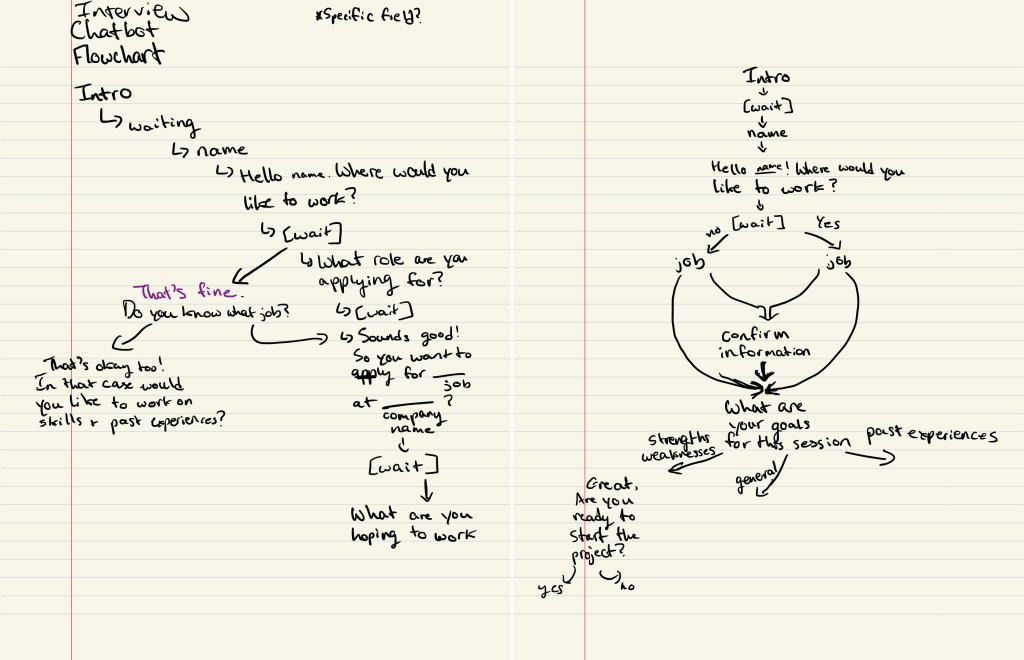
This started to give us an idea of how the script of our chatbot would look as well. We would have the chatbot introduce itself, have a brief introduction conversation with the user, then ask the user what they wanted help with. We also knew that since the chatbot was to be an interview practice assistant, we would want it to have a friendly and positive tone meant to encourage and relax the user.
Setting Up the Chatbot.
Alongside designing the chatbot and its function, we had to setup the actual chatbot using the instructions provided on the GitHub repository for the OxyCSBot. We went through the steps using Scott’s accounts since only one of us had to setup the chatbot. Several tools were needed including:
- GitHub: Forked the repository to have our own copy of the chatbot code to work on
- Heroku: Created a Heroku app and linked that app to our GitHub repository
- Slack: The actual chatbot interface. Authenticated Heroku to Slack so that the Heroku app would connect to Slack
Later, with each update to the oxycsbot.py file in the forked repository, we would have to deploy the app on Heroku, which would automatically update the Slack chatbot to follow our code.
Realizing Our Limitations.
With a better understanding of how the code works, we began to realize and address certain limitations or difficulties with each iteration of our script.
Determining the exact function of the chatbot.
As time went on, we found that giving the user multiple options of help to choose from, which would mean multiple conversations pathways as seen in our original flowcharts, might be difficult to implement considering the length of our conversations. As we progressed, we ended up integrating the options into one.
Function: Have the chatbot lead the conversation into a mock interview, giving advice during the interview on how to answer each of the questions given appropriately.
For example, if the chatbot asks the question, “What are some of your strengths?” and the user answers, the chatbot would respond with something like, “Although all strengths are valuable, make sure that the strengths that you select are appropriate for the position you are applying to. It may help to use the job description or requirements to guide your answer for this question.”
For reference, here are the questions that our chatbot asks, in no particular order:
- What are some of your strengths?
- What is one weakness that you have?
- Describe a time you were struggling with a challenge. How did you overcome it and what did you learn?
- Do you have any work experience or extracurriculars?
- So, how did you find this job and why are you applying?
- Removed in final iteration as user may not have a job in mind
- What skills do you have that would prepare you for this position?
- Removed in final iteration to minimize number of questions
Generalizing the chatbot.
As mentioned previously, we had considered designing this chatbot to speak for a specific industry or field. However, as time went on, we found that it would be a lot simpler to just completely generalize the chatbot for both coding and writing the script. The only detail that we kept was that the chatbot would be directed toward student users.
Updating the Script.
After considering these limitations, we revised our script.
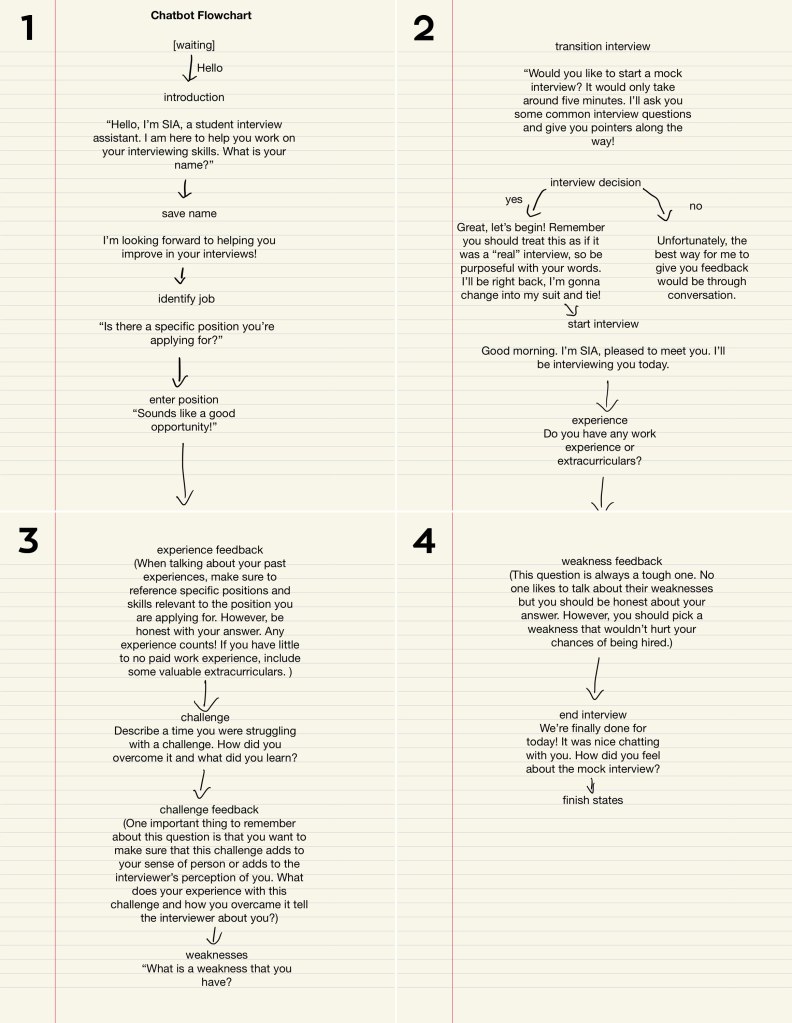
As shown in the flowchart above, we still begin with an introduction conversation between the chatbot and the user. After sharing background information, instead of asking the user what their goals are for this session, the chatbot directly asks the user if they want to go through a mock interview and the users only choices are yes or no.
The interview questions we chose to have our chatbot ask were based on several online sources on most popular interview questions and example mock interviews. Similarly, I also modeled the advice the chatbot gives after the user’s answer on advice found online. Here are some of the sources that we referenced:
- Mock Interview Preparation (Video)
- Mock Interview Script (PDF)
- 27 Most Common Interview Questions (Article)
- Your Ultimate Guide to Answering the Most Common Interview Questions (Article)
This is also when we had finally given our chatbot a name, SIA (Student Interview Assistant).
User Testing Our Script.
As we started to move toward the actual coding and implementation of the chatbot, we realized that it would be a good idea for us to have people review the script we had written, so that once we were able to run the code smoothly, it would be easier for us to take strings from the script as needed. We showed the script we had written to a couple of people, asking them to read through the script and make comments on certain aspects such as syntax, flow of the conversation, and overall tone of the chatbot. Having this information gave us a clearer sense of where to focus our revisions.
Generally, the people we asked approved of the overall flow of the conversation. Most constructive criticism from my experience was on the syntax of the chatbot’s dialogue and the consequent voice/character of the chatbot. In our attempt to give our chatbot a personality, perhaps we had given it . . . a little too much personality.
One reviewer in particular stated,
“I get that it has to be friendly, but some comments just feel unnecessary and/or patronizing.”
One example she pointed out was the phrase, “Wow that sounds like an amazing opportunity!” seen below in the second to last line.
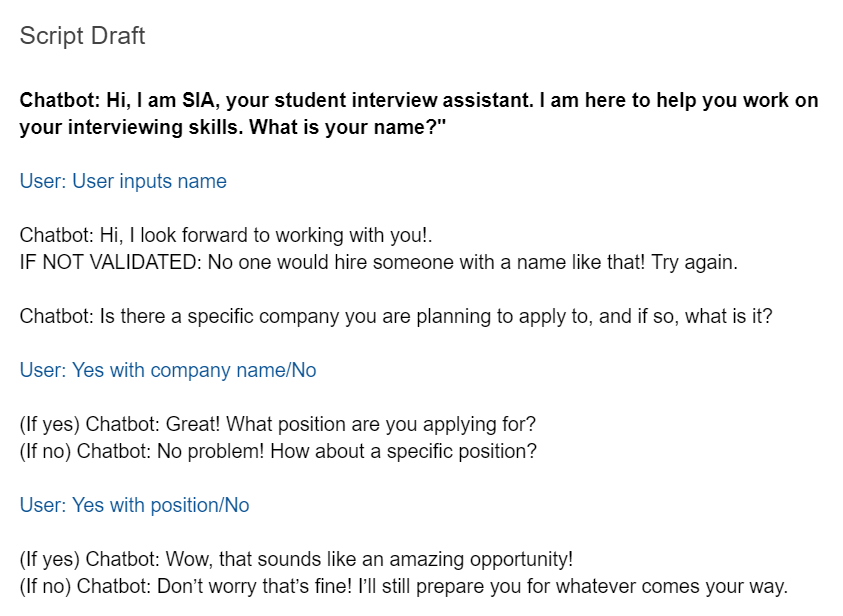
Perhaps in our midterm-induced oblivion, we were not able to process this statement with such tone. Personally, I found this reviewer’s comment to be quite hilarious. ‘At least we gave her a personality.’ Another similar comment on the syntax was that while the language of our chatbot may be endearing, the average user might find some of it excessive. Although it may have been interesting to invoke this type of reaction of users in our final iteration, we decided it would be best to revise some of our phrases for the chatbot to hold a more comfortable conversation and for the tone to better fit our goal with the chatbot.
Other concerns that arose were on the structure of the messages from each respective side. We were asked whether we would be splitting some of the chatbot’s longer messages, such as the advice the chatbot gives, into different lines. We didn’t think that we would be able to achieve this without breaking the code and messing up the conversation, so we decided to just leave them as one block.
A user also pointed out a potential limitation of the chatbot which was that users would have to be able to figure out or assume that they can only send one message to the chatbot at a time and cannot treat the chatbot like one would a messaging app, again an issue that unfortunately we would not be able to take into account.
Coding SIA.
As we were updating our script, we also started to work on the code for the chatbot using the template given to us in the GitHub repository. As computer science students, Courtney and Scott worked on the bulk of the code, while I focused my efforts on revising and finalizing the script and later editing strings as necessary.
Because of the way our chatbot is structured, with the chatbot leading the conversation more so than the user, and with a more linear flow, we were unsure how we should be utilizing the provided functions for our chatbot. Initially Courtney suggested using a counting method, where each time we entered a new state, we would increment the count and use if statements in a “respond_from_” function to determine which state to enter next. However, by using this method, it seemed like the chatbot would get stuck in the first state, which we later realized was due to our misuse of the “respond_from_” function. After several attempts at using this method and failing, we went back to the repository to look over the provided files again.
After getting a better understanding of the functions both in the oxycsbot.py file and the chatbot.py file, Courtney was able to figure out a way to use the original structure of the template and form a pattern that works for our flow.
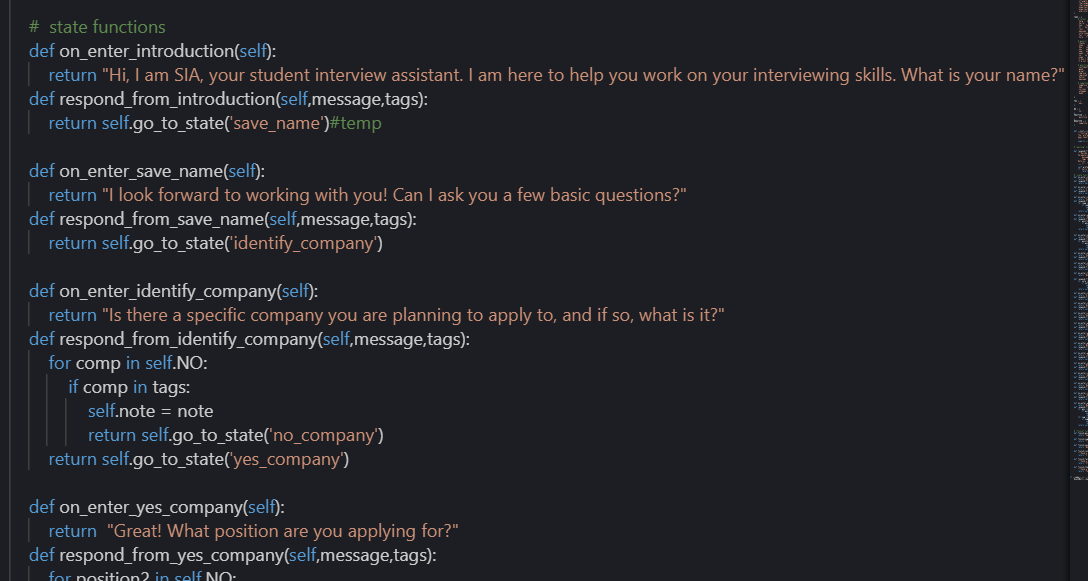
In the code seen above, “on_enter_” functions essentially “tell” the chatbot what to say when in that state while “respond_from_” functions tell the chatbot which state to enter next.
From here, the code was built gradually, as each set of functions was added one at a time, so that we could test frequently and see where, if at any place, the chatbot would fail.
Finished Chatbot and Conclusions.
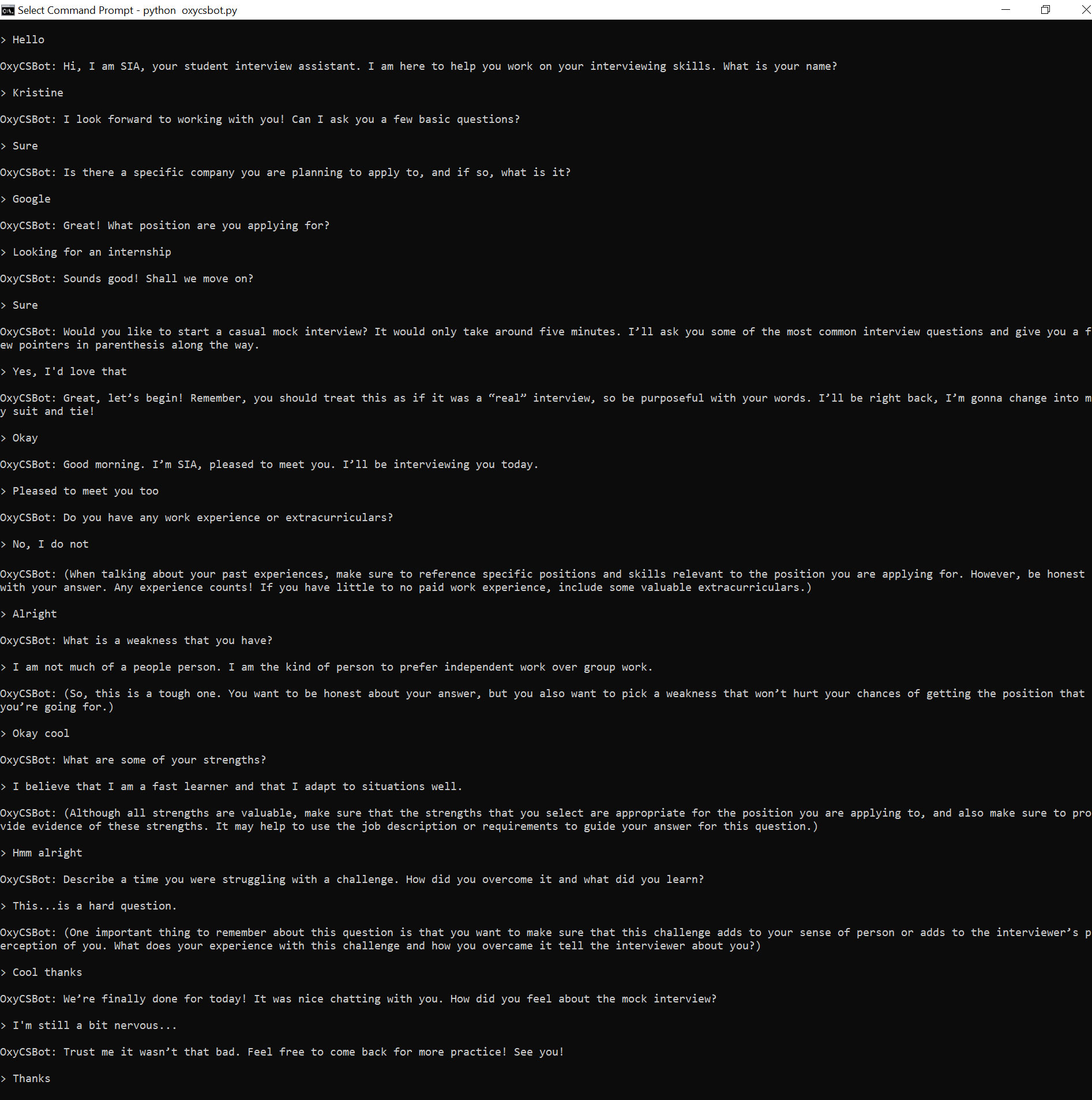
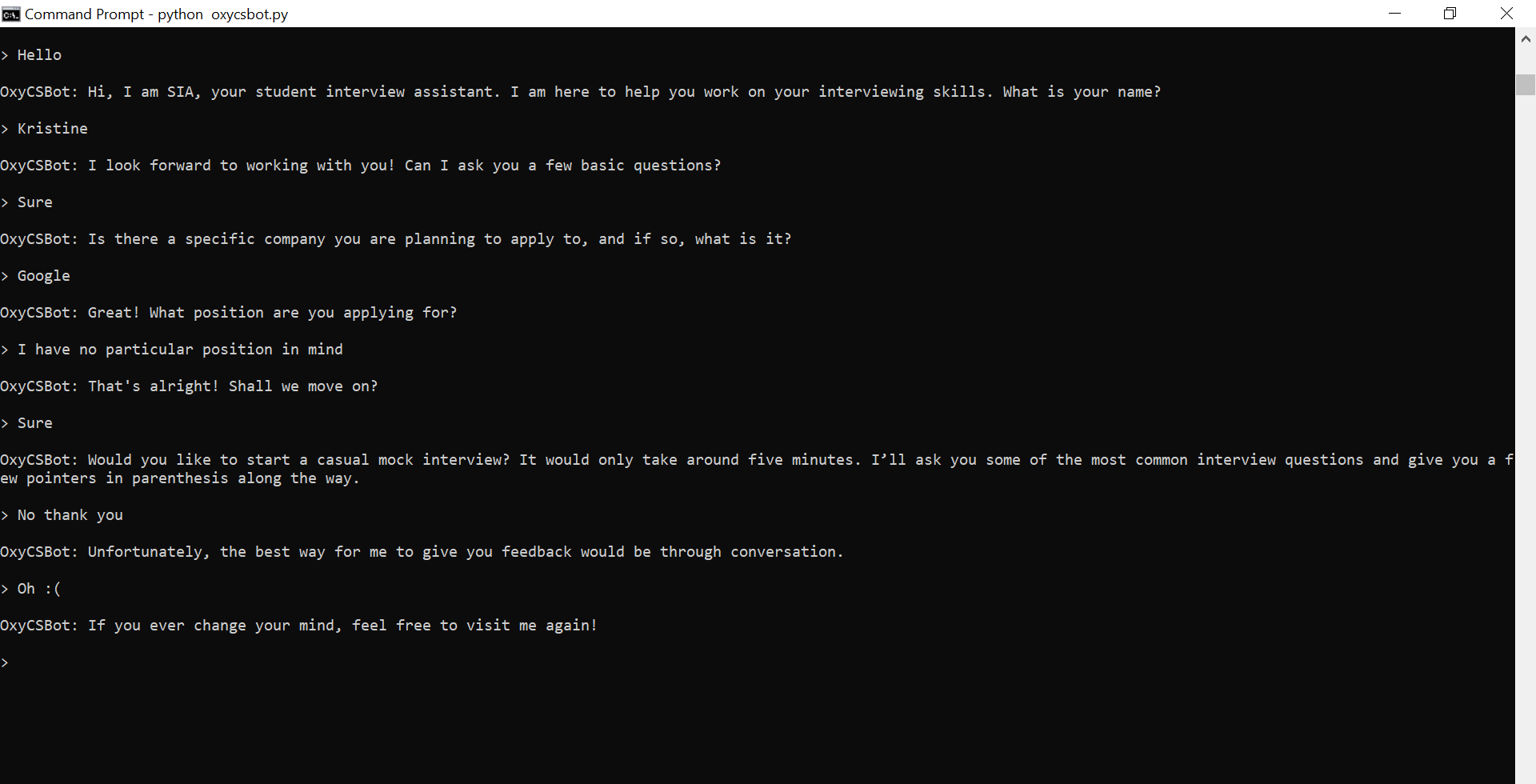
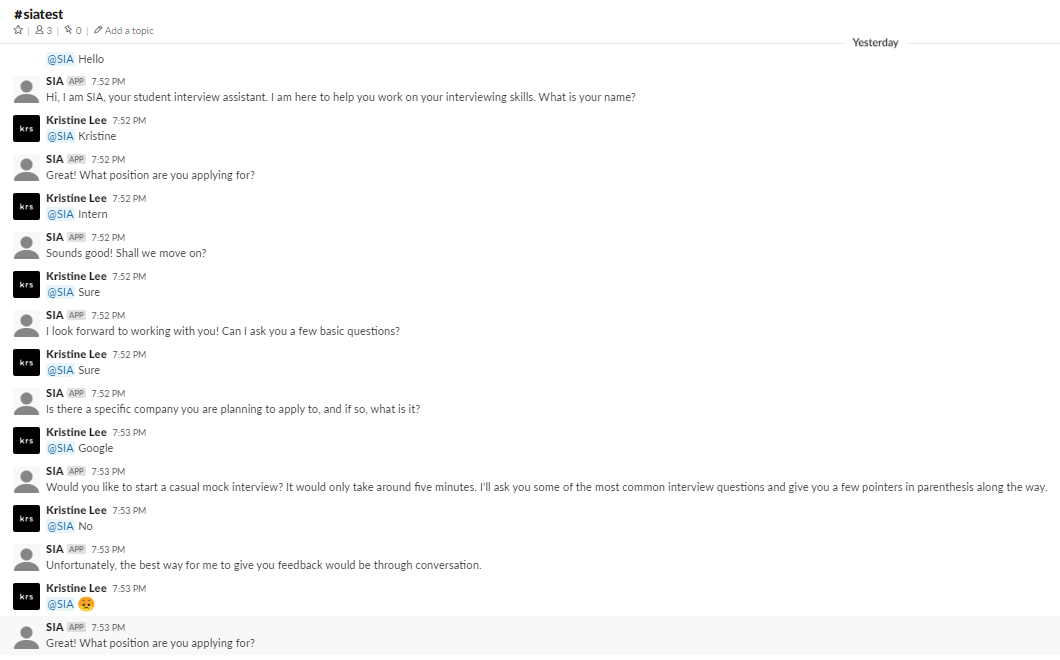
With trial-and-error and much patience, we were able to code a chatbot that follows the flow of our script relatively well without any major breakdowns, although it is still a little faulty on Slack. The conversation with SIA can take two main pathways, one where the user accepts the mock interview offer and one where the user rejects it. SIA will also respond differently depending on whether the user says no to the questions about having a company and/or position in mind and also, at the end, depending on how the user responds to “How did you feel about the mock interview?”
Below are two different transcripts of the final version of SIA (on Command Prompt as that guaranteed a smooth run):
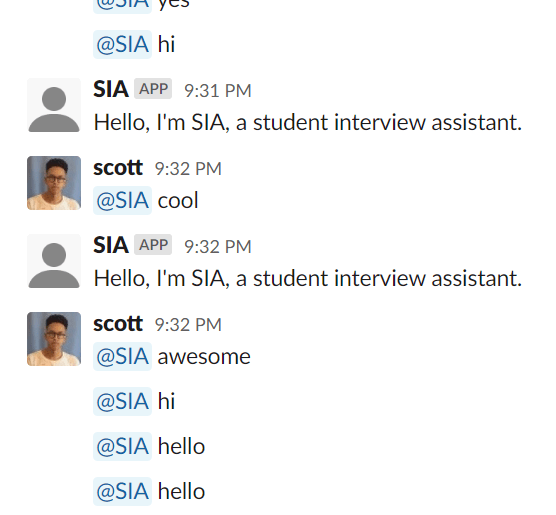
Unfortunately, we were unable to successfully get a full transcript on Slack. Here is an example of a conversation on Slack where the chatbot partially responds correctly:
Some final takeaways.
Building a chatbot that serves a function involving human connection is, indeed, very difficult.
In hindsight, there were so many details and constraints to consider that I hadn’t even thought about getting into this project. Let’s take a look at the aspects I had mentioned at the very beginning of this post.
- Emotional aspect: All of the emotion of this chatbot comes from the way we wrote our dialogue. While at certain states, a certain response from the user may invoke a different tone or emotion from our chatbot, these emotional states are very limited, and it would be impossible to account for the entire spectrum of human emotions. Even when considering these few choices, the smallest changes in syntax can make the chatbot’s side of the conversation stilted and awkward.
- Natural conversation: While the flow of the dialogue of our conversation may make sense, there are definitely limitations of this chatbot and many others that constrains the chatbot from having perfectly natural conversations. For example, with the way our code is written, the user can only give one response before the chatbot responds. Another thing is that our chatbot, obviously, lacks social cues, both conceptually and implementation-wise. So, until the user responds in one way or another, the chatbot will not move on with the conversation.
- Applicable human experience: Similar to emotions, whatever experiences and knowledge this chatbot “has” comes from the information we decide to give it. Because the chatbot’s “humanness” could never compare to that of an actual human, it would be very difficult to have the chatbot change its responses based on “experience”, especially the way a trained professional advisor might.
Surely, there are ways to combat these issues to a certain extent, whether through improving the code or perhaps even using a different method of implementing the chatbot. Some chatbots today even utilize deep learning for that one further step of establishing a human connection.
Overall, I found this project fascinating, at least the conceptual part of it. The better the world becomes at building such chatbots, the harder we find it to not humanize these chatbots, especially as these chatbots are given human attributes such as names and voices. Thus, it is interesting to break down these chatbots and see just where these chatbots are currently succeeding or failing. Then, we’re left to wonder. Will chatbots ever achieve perfect human connection?
 Kristine's HCI Blog