Course registration. The stressful, but unavoidable period of time that comes around every semester to devastate the students of Occidental College.
Okay, well … perhaps course registration isn’t that bad. However, when you ask Oxy students for their thoughts of the course registration process, I can assure you most students would agree that it is not the best it can be. So, why is that? And what is it that we can do to improve this very experience of the course registration process?
(Note: As per the assignment, I will be focusing specifically on the course registration process for students that attend Occidental College.)
A First Glance at the Course Registration Process.
Before we break down any imperfections of the course registration system, we must first understand the system as it is currently. Thus, I will begin by introducing the general registration process as well as common tools and resources a student may use during this process.
While each student may have different processes catered toward their major, year, and experience, here is a condensed version of the general course registration process (provided by the Oxy website):
- Meet with advisors to discuss courses being taken next semester as well as your entire remaining schedule.
- Choose classes and register online.
- Talk to your advisor about alternatives to your schedule in case some first-choice classes may not be available.
- Once classes begin, drop or add courses, if necessary.
Since this is a very vague summary of the course registration process, I will attempt to lay out a slightly more detailed version of the general course registration process, in order that we may better understand the issues of the system discussed later on:
- Plan out a tentative schedule (and alternatives) with course information and Course Reference Number (CRN) codes.
- Meet with advisors to discuss your planned semester as well as to receive your registration time and PIN.
- Once you reach your registration time, log onto myOxy, go to the respective page for adding/dropping classes (myOxy / Academics / ADD or DROP Classes), then enter your PIN in the given text box.
- Once you have access to the page to add courses, enter the CRN codes for each of the classes in the designated text boxes and press submit.
- If a course is successfully added, then it will be listed as a registered course and you will be able to see the number of units you have registered for. Otherwise, if a course is not added, then a message will show up with some alternative actions a student can take.
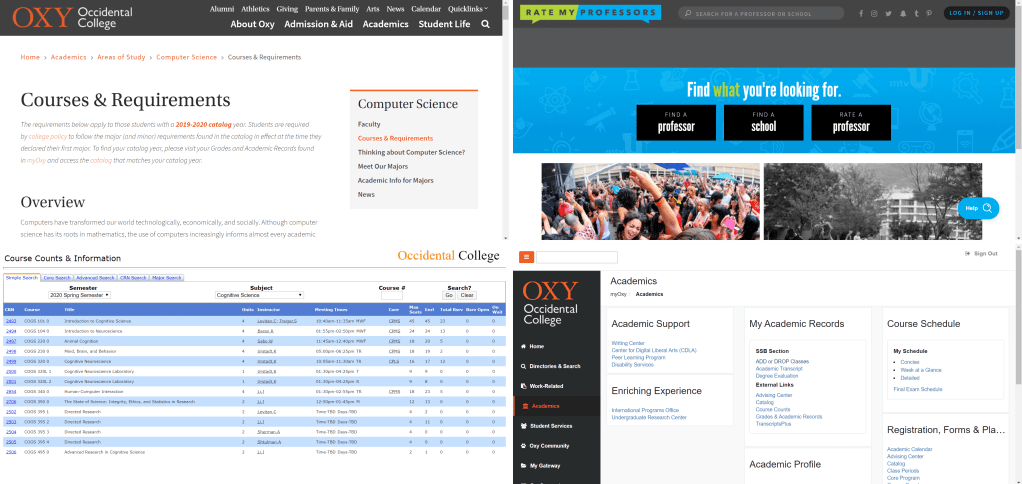
Additionally, here are some general tools that interviewed Oxy students have reported using during their course registration process:
- Course Counts & Information (Website): Simple search system to lookup courses and relevant course information specific to Oxy. Students are given options to search for courses based on different criteria such as by subject, by core requirements, by instructor, etc.
- Occidental College Official Website (Website): Specifically pages for majors and major requirements that students in their respective areas of studies may refer to for information such as faculty members, courses and requirements, and external resources.
- myOxy (Website; Oxy students only): Student portal for students attending Occidental College used for the actual act of registering for classes (myOxy / Academics / ADD or DROP Classes). Also offers students a summary of their academic records (myOxy / Academics / Grades & Academic Records) including information such as GPA, number of completed units, completed core requirements, etc.
- Upperclassmen (or other students in general): Asking other students with experience for advice or additional information on classes and professors.
- Professors (aside from advisors): Asking professors who may teach a specific class or teaches in a specific department to understand better what a course may entail or why taking a particular course may be beneficial.
- Rate My Professors (Website): Allows students to look up reviews and ratings of professors by school and subject.
What do you consider when looking into your classes?
During the student interviews, I asked my interviewees what were 3 to 5 things that they considered most when organizing their semester schedules. As expected, students shared many general considerations such as time and date of classes, instructor teaching the class, course description/level of interest, class size, etc.
However, further along in their answers, students also relayed considerations that differed depending on their student status.
“I try to find classes that I know for sure will fulfill core requirements.” — First-year, Undeclared
For example, students who were first-years or sophomores focused on finding classes that would fulfill their core requirements, whereas students who were juniors or seniors, who most likely have already declared and finalized their majors, focused on finding classes that would fulfill their major requirements. I also found that students in their earlier years of study were more attentive to prerequisites of a class as many 300-level courses and even some 200-level courses are only available to those who have taken prerequisite courses.
So, what are the issues?
Now that we have more background on the Oxy course registration system, we might begin to break down what exactly some of the shared issues of this system might be.
A first impression of the system may be that it is relatively simple. Once a student has their PIN, they can enter the course registration page any time during their designated time period. To add a class or multiple classes, a student must enter the respective CRNs provided on Course Counts and press submit. As long as the websites themselves has not failed, not many users have been found to have any particular trouble understanding this course registration system. One of my interviewees, who just came back from a semester abroad, even stated that compared to the issues of the course registration system of the university she attended, the issues of Oxy’s registration system seem like nothing.
So yes, the system is easy to understand.
However, on the other hand, perhaps the system is too simple, specifically the network of websites used for course registration.
Much of the effort of looking up courses, planning out a schedule, keeping track of CRNs, etc. relies heavily on the manual recording and navigating by a student rather than offering features that may facilitate these needs. Here, I address three aspects of the system that I see failing.
Lack of Signifiers for Course Requirements.
“[I] feel like prerequisites and reservations are generally made clear, but sometimes they [screwed] me over.” — Junior, English major
Before we discuss these further, here is an example of what a list of courses on Course Counts looks like.
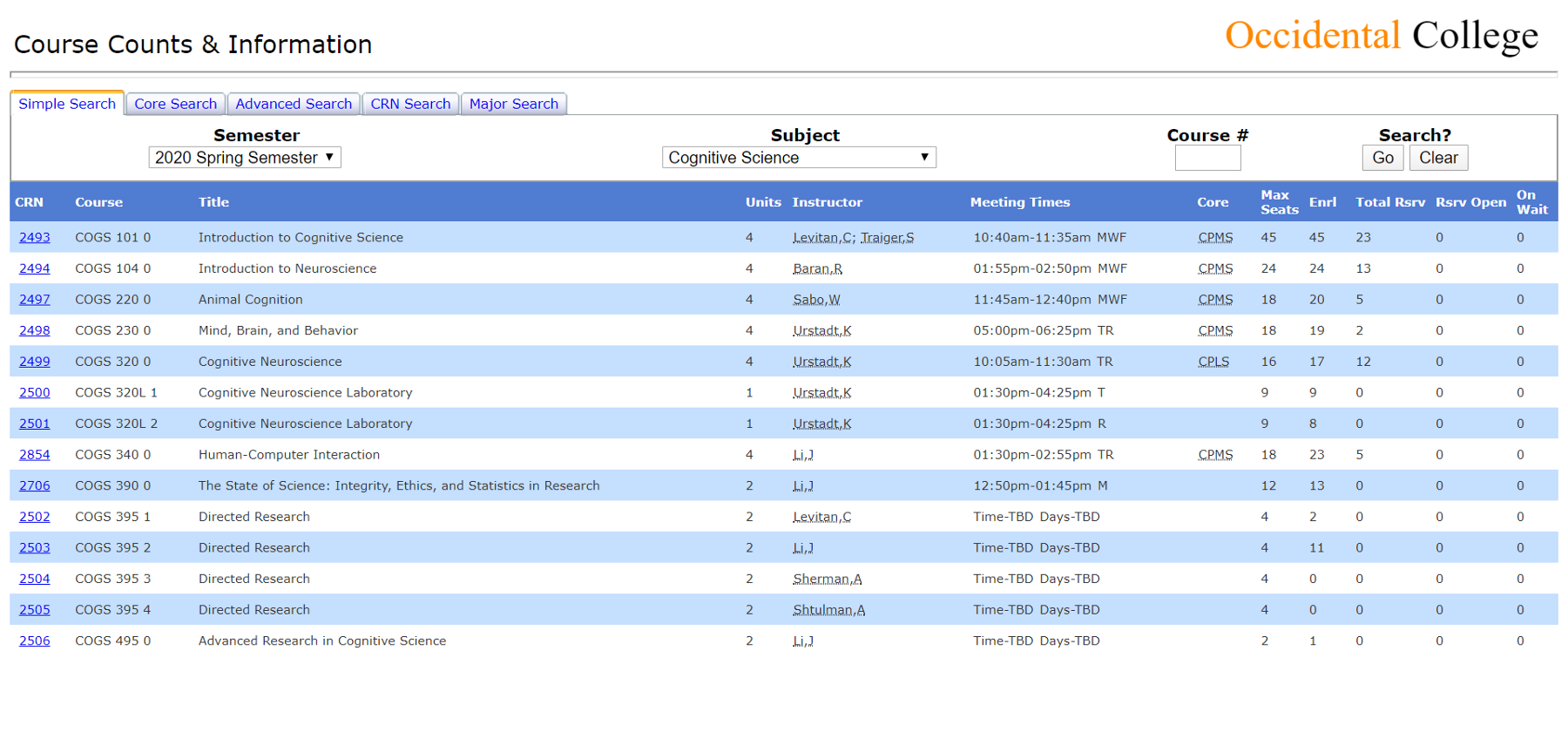
As one can see, many details about each course are given right away:
- Course Reference Number (CRN)
- Course abbreviation
- Full title of course
- # of units
- Instructor
- Meeting times
- What cores the course fulfills
- Number of available seats + how many currently enrolled
However, as we can see, one important aspect of courses is not provided on this page: Course requirements.
Course requirements here refer to prerequisites, co-requisites, reservations (e.g. 5 reserved seats for Majors), and restrictions (e.g. “Not open to seniors in spring semester”). One important aspect of courses that Oxy students must consider are such requirements, meaning knowledge on such requirements is key. In order to see such requirements or even know if a class has such requirements, a student must click on the CRN to view a full summary of the course information. Furthermore, sometimes these requirements are stated very vaguely or are hidden within the course description.
While at first, this issue may only seem like an annoyance, I have had students tell me that lack of immediate knowledge of such requirements have prevented them from taking certain classes that they desired to take.
For example, my roommate had been considering taking Introduction to Psychology but was unable to take it during her first two-years due to schedule conflicts. However, it was not until course registration during our spring semester of sophomore year that she realized this course was only open to first-year students and sophomores. Because it was an intro course, she had never bothered to open up the course description since she assumed the course would not have any particular prerequisites or requirements. In turn, she ended up remaining unaware of the other restrictions until it was too late to take the course.
As a whole, I would say that this problem is an issue of visual signifiers, or the lack thereof. When given a list of classes on Course Counts, a student has no way of properly identifying which courses even have certain restrictions. As seen, assumptions drive actions, and without proper signifiers, a student may attempt to rely on their assumptions or expectations to decide which courses are worth looking further into at a certain point in time or perhaps ever.
Tracking Core/Major/Minor Requirements.
Once I declared my major, my advisor provided us with a Google sheet that includes all of the required courses for my major, Cognitive Science, what semester I took or will take each course, and grade received in each class. The sheet also has a section for all of my core requirements.
This sheet was honestly a lifesaver.
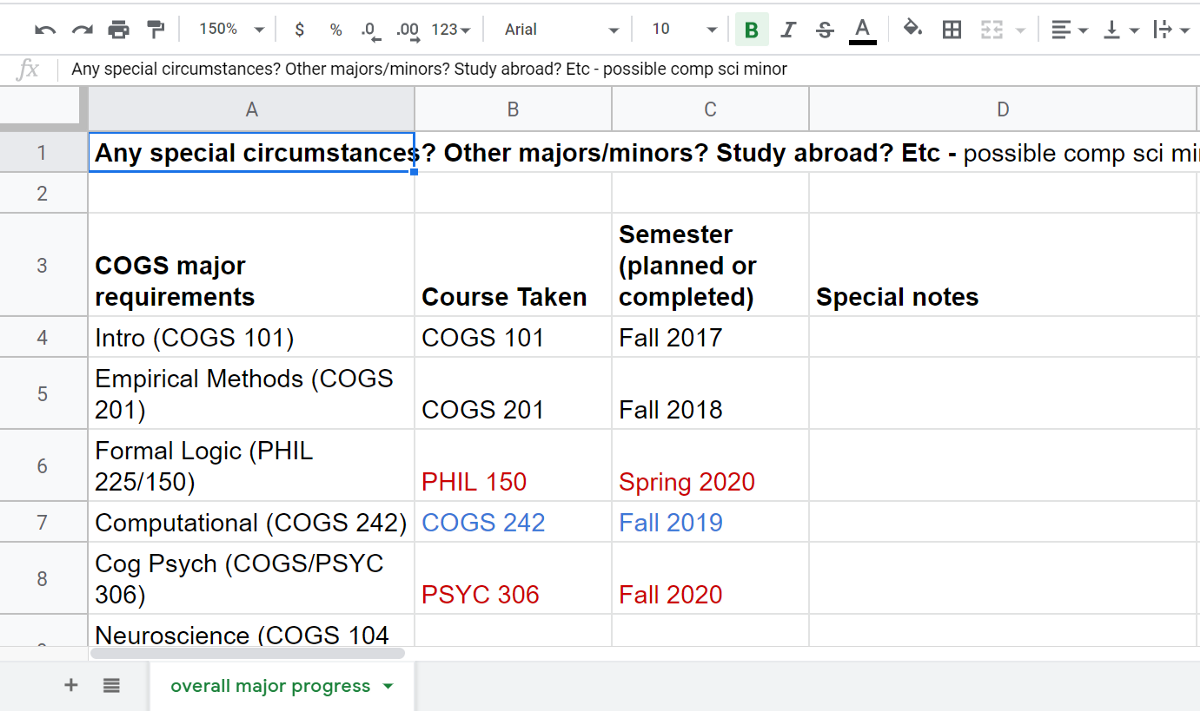
From my knowledge, the only way for a student to view an official record of which core requirements they completed is to log in to myOxy, navigate to the Academics tab, and click on the Grades & Academic Records link. Though a relatively simple process, it can be quite tedious to do this every time. For a more efficient way to keep track of these records, a student may create their own checklist whether on paper or digitally, but that requires the user of this registration system to put in the extra effort of keeping track of the information.
Furthermore, I am not even sure if there is a way for students to view which major/minor required courses they have completed. Again, this is a record that students, as users of this course registration system, have to provide themselves separately or, as in my case, be provided by an advisor.
Here, the issue may be one of constraint. Without easy access to such information on completed requirements, a student may have difficulty directing themselves to courses that would actually fulfill such requirements. Because a student only has so many semesters to settle these requirements, a clear record is imperative for a student to plan their schedules wisely.
Navigation Troubles.
Finally, several of my interviewees reported that one large inconvenience was the lack of connection between each of the websites used in the the course registration system. Students have found it difficult to navigate from one website to another efficiently due to the lack of links between the information on each website.
Tying into our previous issue, one student pointed out that it would be a lot easier if major/core requirements, and even the required courses that they completed, were linked to course counts. So, instead of a student having to manually pull up the Course & Requirements page of their respective major in a separate tab or window, they would be able to click a link on course counts that would automatically direct them to said page.
Fun fact: There is a tab on Course Counts that allows users to search for courses based on their major. However, when you click on the drop-down lists for both Catalog Year and Majors, no options are given. When you click on the Go button, a message will pop up prompting you to select a year from the Catalog Years drop-down list, feedback that the search system requires the user to choose an option from the lists. This is an issue with the signifier. The signifier of a drop-down list gives users the assumption that, by clicking on the list, users will have the affordance of choosing an option.
Another particular navigation issue comes up during the actual process of adding classes. To review, to add a class after entering the course registration page on myOxy, a student must enter the CRN of each course they want to register for into a designated text box and press submit to take action. If the class is successfully added, then the course will show up in a list of current classes. Otherwise, the student will be given alternative actions to take such as being put on the wait list.
Due to such a reliance on the CRN, some of my interviewees have stated the desire for an easier way to access or view these CRNs without having to search through the entire list of classes given on Course Counts. Again, assuming a student has organized a list of desired courses for the next semester, this would be one of those things that many students manually keep track of when having an online system do the same task would be much more efficient for the user.
One of my friends even considered a potential solution: a wish list.
“I wish there was some kind of wish list on myOxy, so I could just make a list in advance of all of the classes I’m considering and just check the ones I want.” — Junior, Cognitive Science major
This issue may be categorized as an issue of affordance. The only way for a student to efficiently add all of their desired courses at once is to have a list of each CRN ready on the side. Without these CRNs, a student is unable to add a course, yet these CRNs must be found externally.
Conclusions.
By giving the perspective of other students as well as breaking down some of the needs and considerations of students, I hope that this critique brought light to some of the issues of the Oxy course registration system. While the system is relatively straightforward, there is no wrong in discussing some improvements that can be explored to increase the usability of this system and to make this process of course registration more efficient.
In talking with one of my roommates about this course registration system, we both came to the agreement that this seemed like one of those systems that students generally notice have inconveniences but just never bother to further think about. This might have been a thought that came up in class, but just because people don’t think about a problem, doesn’t mean there isn’t one. The design of an entire system for such a wide process will never be perfect. We can only hope that slowly improvements will build up the system to be greater.
 Kristine's HCI Blog
One thought on “The Woes of Course Registration.”